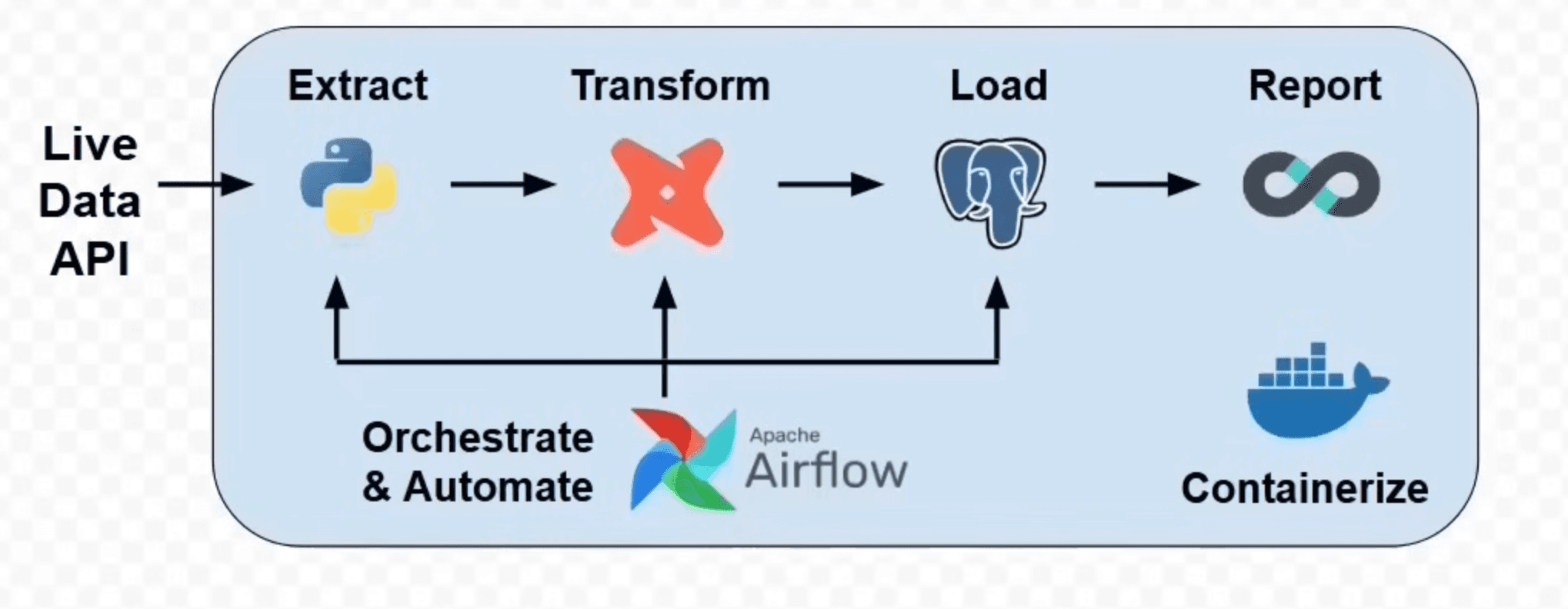


This end-to-end analytics project fetches live weather data from an API, orchestrates data ingestion and transformation pipelines using Dockerized services, loads it into PostgreSQL, transforms it with dbt, and visualizes results with Tableau .
Project Structure
airflow/: Airflow DAGs and configs
dbt/my_project/: dbt models and project files
dbt/.dbt/profiles.yml: dbt profile for Postgres
postgres/: Postgres volume and initialization
api_request/insert_record.py: Python ETL scripts
docker-compose.yml: Service orchestration
External Services
Weatherstack API
Sign up at Weatherstack to get a free API key.
Use this key in your ingestion scripts to fetch current weather data.
Pipeline Steps
API Request & Data Ingestion (Python)
insert_record.pyfetches live weather data via the Weatherstack API and inserts it into PostgreSQL usingpsycopg2.Run locally: python3 api_request/insert_record.py
Setting up PostgreSQL
Defined in
docker-compose.ymlunder servicedb.Accessible locally on
localhost:8000(mapped from container port5432).Persisted to
./postgres/data.
Ingest Data into Postgres
The ingestion script connects to PostgreSQL (host
dbinside Docker network, orlocalhost:8000from host).
Setting up Airflow
Runs in Docker container
airflow_container.Web UI available at: http://localhost:8081
Creating an Airflow DAG
DAGs are stored in
airflow/dags/.Example DAG orchestrates:
API ingestion (
PythonOperator)dbt transformations (
DockerOperator)
Setting up dbt
Runs in
dbt_container.Project files in
/usr/app(mapped from./dbt/my_project).Profiles mounted from
./dbt/.dbt.
Creating dbt Models for Analytics
Models in
dbt/my_project/models/generate analytics tables (e.g.,stg_weather_data,daily_average,weather_report).
Creating DAG Dependencies
Airflow DAG ensures tasks run in order: Ingest ➡ Transform ➡ Export
Exporting Data to CSV
Use Python (
pandasorcsv) or SQLCOPYcommand to export data from PostgreSQL to a CSV in a mounted volume for use in BI tools.
Visualization & Reporting
Importing Data in Tableau
Option 1: Connect directly to PostgreSQL:
Host:
localhostPort:
8000Database:
dbUser:
userPassword:
passwordSchema:
devOption 2: Import from CSV export.
Visualizing the Data
Create dashboards for daily averages, trends, and weather analytics grouped by date/city.